
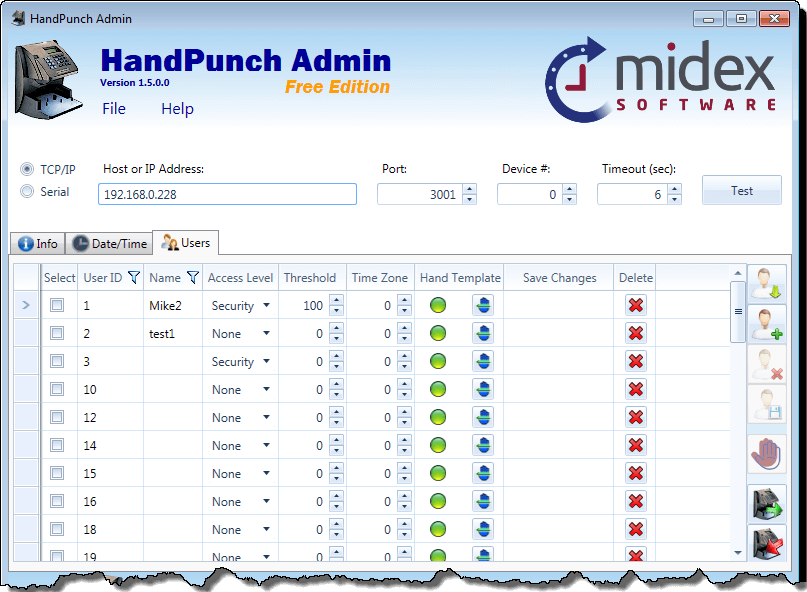
[vc_row][vc_column width=”3/4″][vc_column_text]HandPunch Admin is a free HandPunch software allowing you to manage your HandPunch remotely from your desktop via Serial or TCP/IP connection.
This HandPunch Software is compatible with all HandPunch models including HP1000, HP1000E, HP2000, HP2000E, HP3000, HP3000E, HP4000 and HP4000E.
[/vc_column_text][vc_empty_space height=”16px”][vc_custom_heading text=”HandPunch Admin Features” font_container=”tag:h3|text_align:left” use_theme_fonts=”yes”][list style=”check” color=”blue”]
- Connect to HandPunch via Serial or TCP/IP connection
- Connect using HandPunch via local IP or via host name with custom port number
- View your HandPunch specifications
- Change Date and Time in HandPunch
- Change Date and Time Formats on the HandPunch
- Calibrate HandPunch
- View all users in your HandPunch
- Delete users from the HandPunch
- Add users to HandPunch
- Modify users in HandPunch (change their access level, threshold, time zone and name)
- Register Hand Templates
- Compare hand templates of all users in the HandPunch to identify the ones that are similar
- Change default HandPunch threshold value
- Backup and Restores users
- Export users to CSV file
- Import users from CSV file
[/list][vc_custom_heading text=”HandPunch Admin Upcoming Features” font_container=”tag:h3|text_align:left” use_theme_fonts=”yes”][list style=”arrow” color=”blue”]
- Upload User Messages
- Bell Schedule
- If you would like to suggest a feature, click here.
[/list][/vc_column][vc_column width=”1/4″][vc_wp_custommenu title=”HandPunch Admin” nav_menu=”29″][vc_empty_space][vc_btn title=”Download HandPunch Admin
Free Download” shape=”rounded” color=”blue” align=”center” i_icon_fontawesome=”fa fa-download” button_block=”true” add_icon=”true” link=”url:%2Fdownloads%2FHandPunchAdminSetup.exe|title:HandPunch%20Admin||” el_class=”download-button”][vc_empty_space height=”16px”][vc_wp_custommenu title=”Buy HandPunch” nav_menu=”111″][/vc_column][/vc_row][vc_row][vc_column][vc_column_text]
[/vc_column_text][/vc_column][/vc_row]